Skip to content
English - United Kingdom
  • There are no suggestions because the search field is empty.

Adding a second account

For iOS

Logging in to your second account

If one of the programs is already linked to your email address, you will need a username for the other program.

The hospital has created this for you.
Don’t know your username? Please contact your healthcare provider.

Are you going to use the Luscii app for multiple programs?

You can link these programs within the Luscii app.

Go to your profile settings (the gear icon in the top right) and tap “Add another account.”

You will then see the regular login screen and can enter the username that belongs to your second account.
Note: if your first account is linked to your email address, you can only log in to your second account using your username. You will still receive the verification code at your email address as usual.

image1 412ACC22ACC3

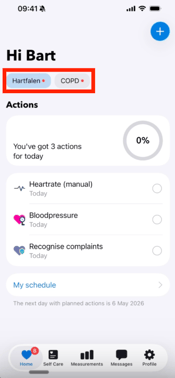
Once you are logged in, you can switch between programs by going to your accounts on the Actions page. There you can see which account is currently active (the one with the check mark). Tap the other account to enter measurements there and switch between accounts.

2ACC42ACC5

If you still can’t activate your second account, please contact our Support Heroes by sending a message to support@luscii.com.


For Android

Adding a second account

If one of the programs is already linked to your email address, you will need a username for the other program.

The hospital has created this for you.
Don’t know your username? Please contact your healthcare provider.

Are you going to use Luscii for multiple programs?

You can link these programs within the Luscii app.

Go to your profile settings (the circle icon in the top right) and tap “Add another account.”

You will then see the regular login screen and can enter the username that belongs to your second account.
Note: if your first account is linked to your email address, you can only log in to your second account using your username. You will still receive the verification code at your email address as usual.

1nl-22nl-33nl-3

Once you are logged in, you can switch between programs by going to your profile settings. Your different accounts will appear there immediately.

4nl-35nl-3

If you still can’t activate your second account, please contact our Support Heroes by sending a message to support@luscii.com.